
A no-show tracker is a simple log of every booking, kept or missed. It needs eight columns: date, day and time, client, service, value, status, notice and reason. Fill it in the same day for 30 days. Then read four numbers from it. They are your no-show rate, repeat clients, worst time slots and lost money.
That is the whole method. Most people who search for a no-show tracker want a template, so the columns come first below. After that, this guide shows how to read the numbers, and what each pattern tells you to change. It also covers our free tools, and what Aasure itself can and cannot do yet.
Why a no-show tracker beats a rough guess
Most owners know no-shows hurt, but few know the real number. So the pain stays vague, and vague problems rarely get fixed. A no-show tracker turns "it feels like a lot" into a figure you can act on.
The scale is real, too. Fresha surveyed over 200 UK beauty and wellness businesses in December 2025. Nearly a third lost 5–10% of monthly revenue to cancellations. The same survey found 62% of clients give less than 24 hours' notice when they cancel.
Healthcare has measured this far more carefully. For example, take a 2023 paper in the British Journal of General Practice. It put missed GP appointments in England at about 7.2 million in 2019. That cost the NHS around £216 million. Of course, a clinic is not a salon or a PT studio. Still, the NHS research shows which patterns to look for, because it tracked millions of appointments.
What to record in your no-show tracker
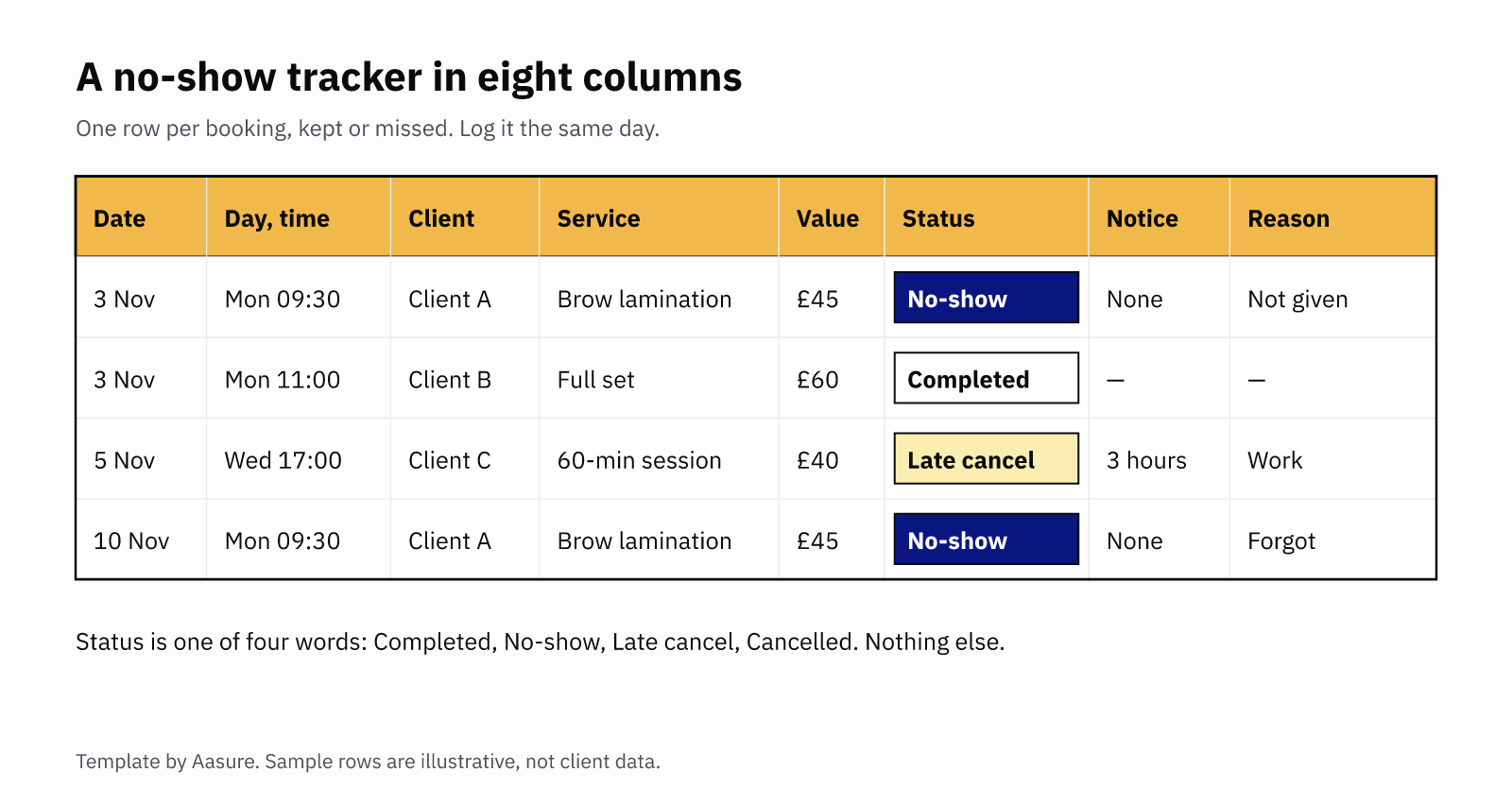
Keep one row per booking, including the ones that went fine. Otherwise you cannot work out a rate, because you have nothing to divide by. Here are the eight columns, and why each one earns its place.
| Column | What to write | Why it matters |
|---|---|---|
| Date | The appointment date | Shows trends week by week |
| Day and time | For example, Mon 09:30 | Finds your weakest slots |
| Client | Name or initials | Spots repeat no-shows |
| Service | What they booked | Shows which services get skipped |
| Value | The price in pounds | Adds up the money you lost |
| Status | Completed, No-show, Late cancel or Cancelled | The number you divide |
| Notice | Hours of warning given | Separates late cancels from fair ones |
| Reason | What the client said, if anything | Shows whether reminders would help |
Two rules keep the log useful. First, status must always be one of four fixed words. If you write "DNA" one day and "didn't come" the next, no formula can count them. Second, fill in the row on the day. By Friday, you will not remember who texted and who simply vanished.
You can add a ninth column if you like: how the client booked. For instance, you might write online, phone or walk-in. That matters later, because some reminder systems only cover online bookings.
How to set up a no-show tracker in a spreadsheet
A free spreadsheet works well as a no-show tracker. Google Sheets and Excel both do the counting for you, once the columns are in place.
- Make the eight columns in row one, in the order above.
- Add a dropdown to Status. Then nobody can type a fifth word by mistake.
- Count each status. In Google Sheets, the COUNTIF function counts matching rows, for example every "No-show".
- Split by day or client. Excel's COUNTIFS function counts rows that match two things at once, such as "No-show" and "Mon".
- Add up lost value. Total the Value column for rows marked No-show or Late cancel.
One caution before you start. Client names in a spreadsheet are personal data, which the ICO's guide to personal information makes clear. So keep only what you need, protect the file with a password, and do not share it. Also, the ICO's storage limitation principle means you should delete old rows once they stop being useful.
Reading your no-show tracker after 30 days
After a month, you have enough rows to learn something. Ideally that means around 100 bookings. If you are quieter, run the no-show tracker for two months instead. Then work out these four numbers.
Your no-show rate
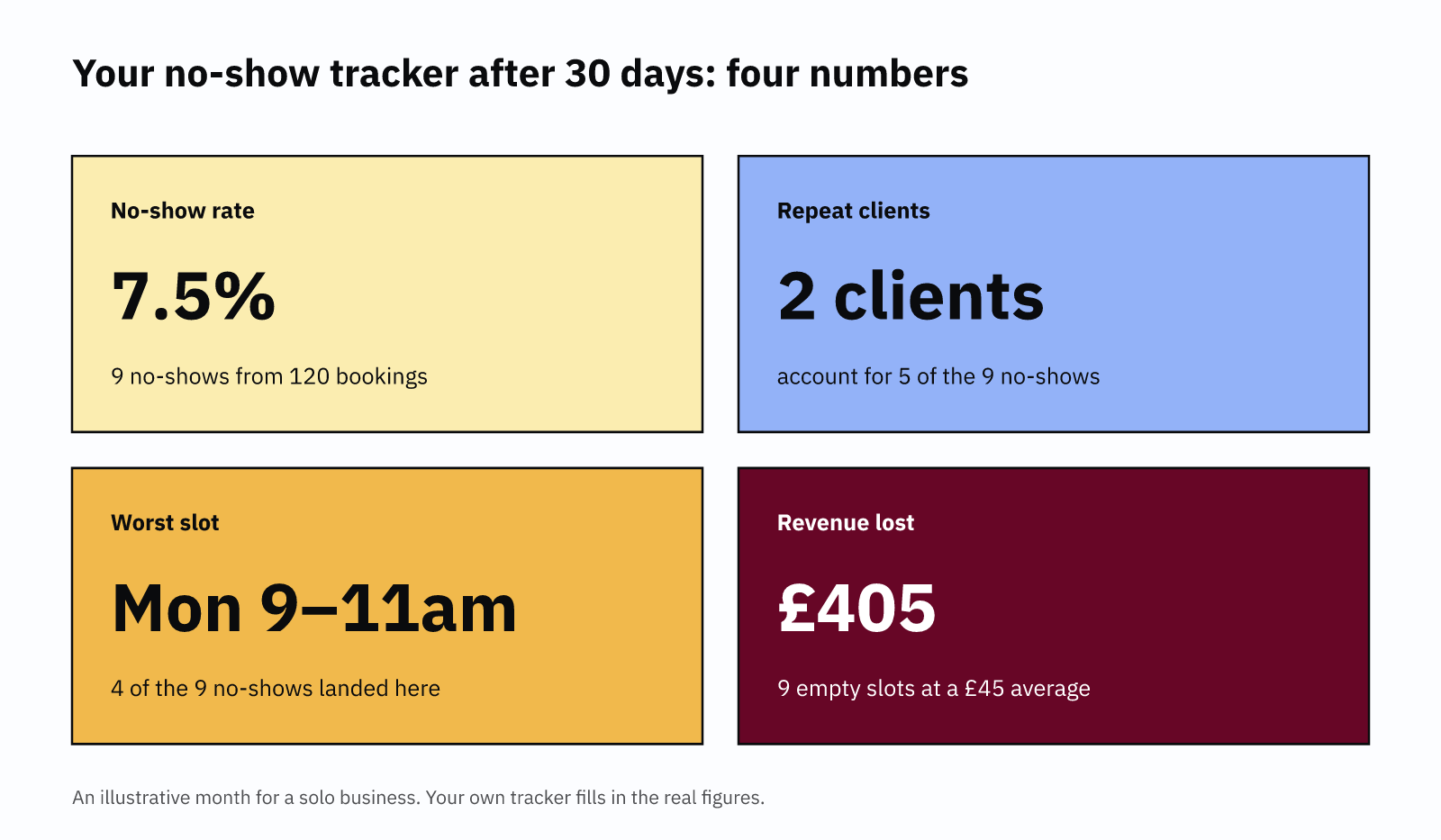
Divide no-shows by every booking that was due to happen, then multiply by 100. So 9 no-shows from 120 bookings gives a 7.5% no-show rate. Keep late cancellations as a second figure, because you can sometimes refill those slots. Cancellations with fair notice do not count at all.
Your repeat clients
Next, sort the no-show tracker by client. Missed appointments rarely spread evenly across everyone. In a Scottish study of 550,083 GP patients, 19% missed more than two appointments over three years. Similarly, a follow-up study of 824,374 patients found 53.3% missed none in three years. In a small business, two or three clients often explain most of the problem.
Your worst days and times
Then sort your no-show tracker by the Day and time column. Patterns here can be surprisingly strong. In 4.5 million Scottish hospital appointments, the missed rate was highest on Mondays at 11%. By contrast, Fridays were lowest, at 9.7%. Your own pattern may differ, which is exactly why you track it.
Your lost revenue
Finally, add up the Value column for every no-show and late cancel. In the example month, that is £405. The No-Show Cost Calculator then projects a figure like that across a full year. It also counts the prep time you lose with each empty slot.
What each pattern in your no-show tracker tells you to change
Each of the four numbers points to a different fix. So match the fix to the pattern, rather than trying everything at once.
Many clients forget. If the Reason column keeps saying "forgot", reminders are the answer. In Fresha's survey, 22% of clients named forgetting as a reason for cancelling or missing a booking. Moreover, a Cochrane review of seven studies found text reminders lifted attendance from 67.8% to 78.6%. Wording matters as well. Two NHS trials in London tested reminder wording. Naming the cost of a missed slot cut missed appointments from 11.1% to 8.4%.
A few clients repeat. Talk to them before you punish them. Life can get in the way, and the tracker cannot see that. Professor Andrea Williamson, who studies missed appointments at the University of Glasgow, put it plainly:
"Our research shows that we need to move away from a system of patient blame for service problems…"
Her point is that services should look for the barriers first. In practice, that means asking a simple question. Would a different time suit them better? If the no-shows continue after that, a written policy is fair. Our guide on how to write a no-show policy covers the wording. Similarly, our personal trainer cancellation policy guide suits PTs and coaches.
One slot keeps failing. Move your most reliable clients into that slot, or shorten it. Alternatively, offer it only to regulars you trust.
The lost revenue is large. A charge for late cancellation may be fair. However, GOV.UK guidance says it must reflect your genuine loss. Your no-show tracker is the evidence for that loss.
Free no-show tracker tools you can use today
You do not have to build a spreadsheet from scratch. Here are three options, from simplest to most joined-up.
Our free Calendar No-Show Tracker. The Calendar No-Show Tracker is a monthly calendar. You click a date and add each appointment with its client, service, value and status. Then a side panel keeps a running tally and your lost revenue for the month. Your data stays in your browser, and the tool uploads nothing. Logging is free, while downloading a CSV needs a one-time sign-up.
Our No-Show Cost Calculator. The No-Show Cost Calculator takes your rate, prices and working weeks. Then it shows your yearly loss. It works best once your no-show tracker has given you a real rate.
Tracking inside Aasure. If you already take bookings in Aasure, you can skip the separate log. Open a booking in the Diary, choose Mark as, then pick No-show. After that, each client's History tab shows their attended, upcoming, no-show and cancelled counts. You can also filter the Diary by appointment status.
Aasure has limits you should know about, though. Marking a no-show records it, but charges no fee and sends no message. It also cannot be undone. Once you switch it on, the reminder goes by email, and only for bookings made online. Bookings you add yourself get no reminder. So share your booking page if you want clients to receive one. Aasure does not take deposits or card payments yet. If you need deposits today, a platform with payments will suit you better.
Whichever tool you pick, the method stays the same. Log every booking, read the four numbers after 30 days, then fix the pattern the no-show tracker shows you.
Common questions
What should a no-show tracker include?
Eight columns: date, day and time, client, service, value, status, notice given and reason. Status should be one of four fixed words: Completed, No-show, Late cancel or Cancelled.
How do I work out my no-show rate?
Divide your no-shows by every booking that was due to happen, then multiply by 100. Count cancellations made with fair notice separately, because you had time to refill those slots.
How long should I track no-shows before changing anything?
Track for at least 30 days, or around 100 bookings if you are busy. A single week is too small to show which clients, days or times cause most missed appointments.
Is a spreadsheet of client no-shows allowed under UK GDPR?
Yes, but it holds personal data, so treat it that way. Keep only what you need, store it securely, and delete old rows once they no longer serve a purpose.
Log no-shows where you already book.
In Aasure you mark a no-show in the Diary, and each client's History tab counts them for you. Online bookings get an email reminder once you switch reminders on. Every plan starts with a 30-day free trial, and you need no card.
Sign up Open the free no-show tracker →